

Form 8 Voter ID Correction is used to update details such as mobile number, change of address due to shifting, correction in name, and other personal information in the voter ID card. You can make these changes through both online and offline methods, which are explained in detail below.
How to Fill Voter ID Correction Form 8 Online - (How to Correct/Update Voter ID Online)
Step 1: Go to the CEO Official Website, voters.eci.gov.in
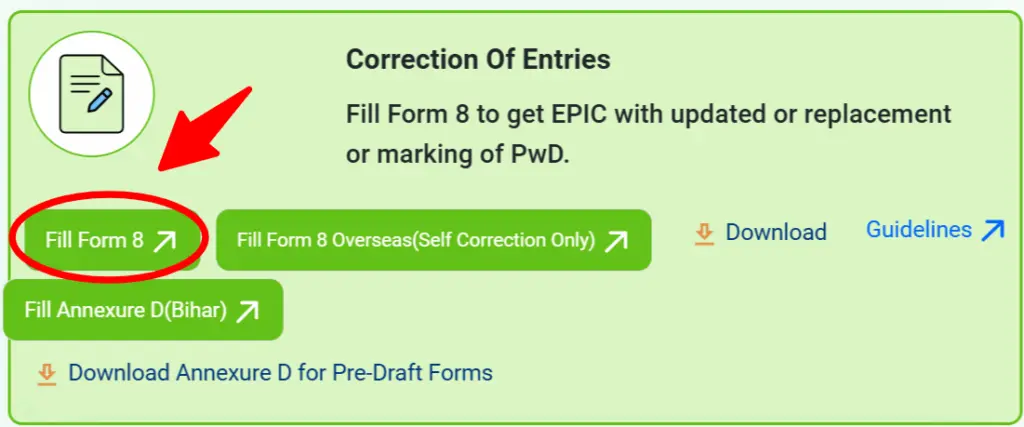
Step 2: On the homepage of the website, you have to click on “Form 8” under the “Correction Of Entries” section
Step 3: To fill out the Voter ID correction form, you first need to log in by entering your registered mobile number and the captcha code. After that, enter the OTP received on your mobile number to complete the login process. If you are not registered, click on the “Sign Up” button to create a new account.

Step 4: On the next page, click on “Form 8”, then select the “Self” option. Enter your EPIC number and click on the “Submit” button. After submitting, your voter record details will appear on the screen.

Step 5: Now you have 4 option from which you want to make correction in Voter ID card.
- If your Residence is shifted Within Assembly Constituency or Outside Assembly Constituency
- Second option is for personal information like to update (change) mobile number, Name, Father name and other details change.
- In this option you can get your Voter ID card with existing details like your old voter ID card stolen or damage.
- The last one option is used by the PWD applicants who want to update handicapped certificate with Voter ID card.

Step 6: On the next page Form 8 will be displayed with your details as the screenshot shown below.

Step 7: Now in next B section is the voter personal details and select the option for which you fill this form 8 online as the screenshot shown below.

Step 8: After select the correction option then next section is declaration as the screenshot is shown below.

Step 9: After declaration, you have to enter the captcha code and click on submit button, and you will receive the reference number to track the application station.
Track Form 8 Voter ID Correction Application Status
After submitting Form 8, Voter’s can check the application status online to know if their name is added to the voter list.
Step 1 Open voters.eci.gov.in and login using your mobile number, password and OTP.
Step 2 Select Track Application Status from the dashboard.

Step 3 Enter your reference ID number and click on Submit button.
Step 4 Your voter registration status will appear on the screen.
How to Download Form No 8 for Voter IC Card PDF
This method is useful for people who prefer paper forms or do not use the internet.
Step 1 Visit your nearest state election office and ask for Form 6 or directly download from the link giver below.
Election Form 8 in Hindi
Step 2 Fill the form with personal details, address and date of birth details.
Step 3 Submit the filled form along with documents and one passport-size photo.
Helpline Number for Complaint
- 1950 (Toll-free Number)
- [email protected]