Download App

Punjab 2003 Voter List PDF - Download Last SIR Electoral Roll District/Assembly - Wise

Election Commission of India (ECI) has released the Punjab Voter List 2003 on its official website voters.eci.gov.in. Citizens can now search old voter records, including voter name, address, and EPIC number online. During the Special Intensive Revision (SIR) held in 2003, the electoral rolls of all 117 Assembly constituencies in Punjab were revised.

As per the 3rd Phase SIR 2026 schedule, the ECI published the draft electoral roll on 03 August 2026, while the final electoral roll will be released on 12 October 2026.

Also Check - SIR 3rd Phase Schedule 2026 for 16 States and 3 UTs

2003 Voter List Village-wise Punjab PDF - Download Old SIR Electoral Roll (Using Direct Link)

Amritsar

Assembly NumberOld SIR Download Link
12Beas
13Majitha
14Verka
15Jandiala
16Amritsar North
17Amritsar West
18Amritsar Central
19Amritsar South
20Ajnala
21Raja Sansi
22Atari
23Tarn Taran
24Khadoor Sahib
25Naushehra Panwan
26Patti
27Valtoha

Bhatinda

Assembly NumberOld SIR Download Link
109Talwandi Sabo
110Pakka Kalan
111Bhatinda
112Nathana
113Rampura Phul
114Joga

Faridkot

Assembly NumberOld SIR Download Link
102Panjgrain
103Kot Kapura
104Faridkot

Fatehgarh Sahib

Assembly NumberOld SIR Download Link
78Amloh
79Sirhind

Ferozepur

Assembly NumberOld SIR Download Link
90Balluana
91Abohar
92Fazilka
93Jalalabad
94Guru Harsahai
95Ferozepur
96Ferozepur Cantt
97Zira
98Dharamkot

Gurdaspur

Assembly NumberOld SIR Download Link
1Fatehgarh
2Batala
3Qadian
4Shri Hargobindpur
5Kahnuwan
6Dhariwal
7Gurdaspur
8Dina Nagar (SC)
9Narot Mehra
10Pathankot
11Sujanpur

Hoshiarpur

Assembly NumberOld SIR Download Link
45Garhshankar
46Mahilpur
47Hoshiarpur
48Sham Chaurasi
49Tanda
50Garhdiwala
51Dasua
52Mukerian

Jalandhar

Assembly NumberOld SIR Download Link
28Adampur
29Jalandhar Cantt
30Jalandhar North
31Jalandhar Central
32Jalandhar South
33Kartarpur
34Lohian
35Nakodar
36Nur Mahal
39Phillaur

Kapurthala

Assembly NumberOld SIR Download Link
40Bholath
41Kapurthala
42Sultanpur
43Phagwara

Ludhiana

Assembly NumberOld SIR Download Link
53Jagraon
54Raikot
55Dakha
56Kila Raipur
57Ludhiana North
58Ludhiana West
59Ludhiana East
60Ludhiana Rural
61Payal
62Kum Kalan
63Samrala
64Khanna

Mansa

Assembly NumberOld SIR Download Link
115Mansa
116Budhlada
117Sardulgarh

Moga

Assembly NumberOld SIR Download Link
99Moga
100Bagha Purana
101Nihal Singh Wala

Muktsar

Assembly NumberOld SIR Download Link
105Muktsar
106Giddarbaha
107Malout
108Lambi

Nawan Shahr

Assembly NumberOld SIR Download Link
37Banga
38Nawan Shahr
44Balachaur

Patiala

Assembly NumberOld SIR Download Link
70Banur
71Rajpura
72Ghanaur
73Dakala
74Shutrana
75Samana
76Patiala Town
77Nabha

Ropar

Assembly NumberOld SIR Download Link
65Nangal
66Anandpur Sahib
67Chamkaur Sahib
68Morinda
69Kharar

Sangrur

Assembly NumberOld SIR Download Link
80Dhuri
81Malerkotla
82Sherpur
83Barnala
84Bhadaur
85Dhanaula
86Sangrur
87Dirba
88Sunam
89Lehra

Voter List 2003 Punjab PDF - Search Name & Download from voters.eci.gov.in

STEP 1: Visit the official website of ECI at voters.eci.gov.in

STEP 2: At the home page of the website, click on "Search Your Name in Last SIR" under forms section as given below

Search Name in Last SIR - Link

STEP 3: On the next page, click on "Search in last SIR E-Roll" tab and then select your "State", "District", "Assembly Constituency", "Polling Station No. and Name" and then click on "View" button as shown in below image.

Select Details to Download E-Roll PDF

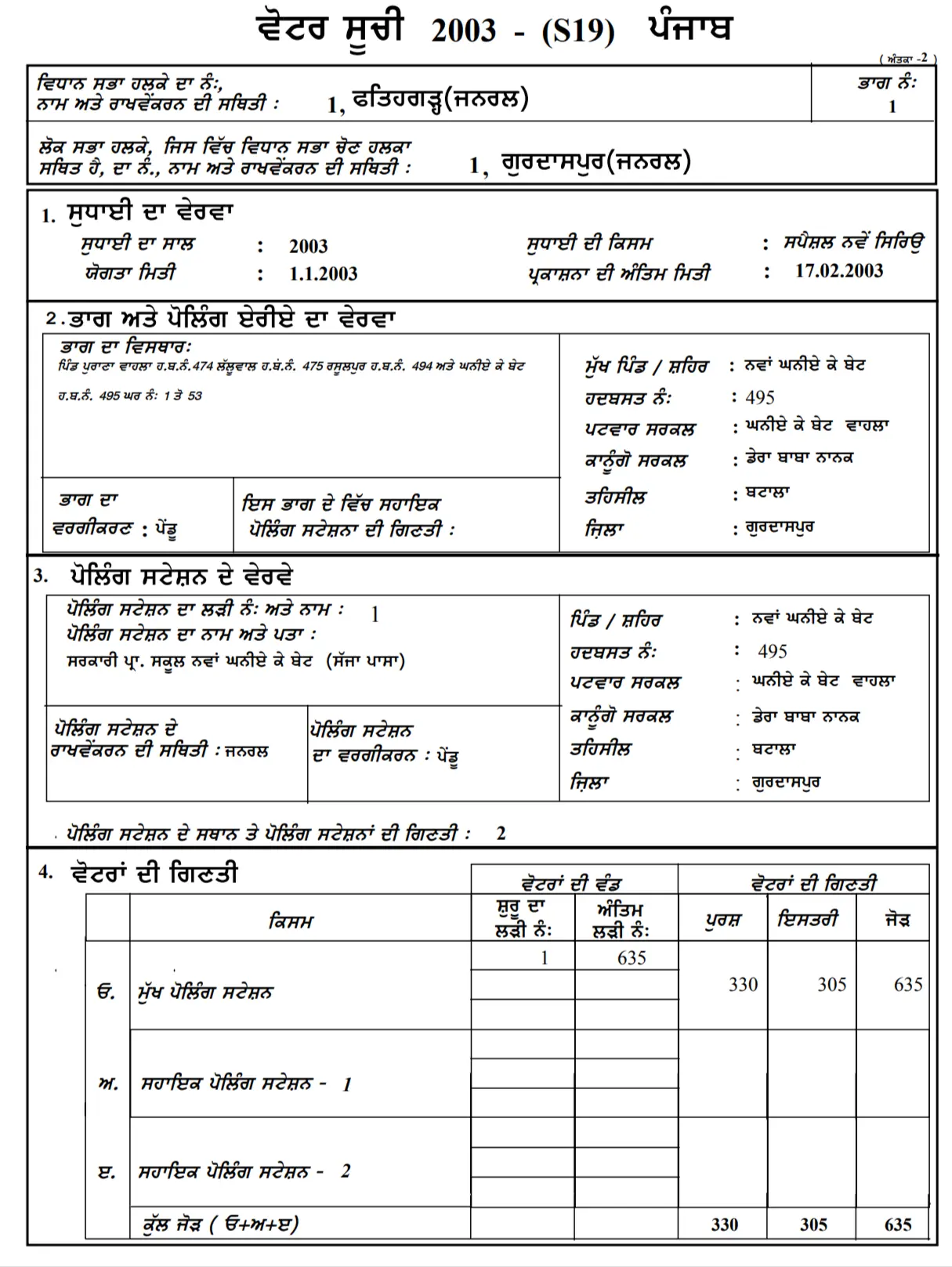
STEP 4: After clicking on View button, the PDF of selected polling station will open in new tab and voter list will be shown as below.

Voter List 2003 - Sample PDF

STEP 5: You can download this PDF by clicking the download icon and save it to your computer/mobile and then search your name in PDF.

Search Name in Punjab 2003 Voter List by Elector Details

You can directly search a name in the old SIR voter list of Punjab by entering some details on the ECI portal, use below steps.

STEP 1: On the same Old SIR Page, click on the "Search by Elector Details" tab as shown in below image.

Search by Electoral Details

STEP 2: Now select or fill all the required (State and Full Name in Last SIR) and optional details, enter the captcha code and click on "Search" button. The matching details will be shown on the screen.